ellalgo package
Subpackages
Submodules
ellalgo.conjugate_gradient module
- ellalgo.conjugate_gradient.conjugate_gradient(A, b, x0=None, tol=1e-05, max_iter=1000)[source]
Solve the linear system Ax = b using the Conjugate Gradient method.
The Conjugate Gradient method is an iterative algorithm for solving symmetric positive definite linear systems. It is particularly efficient for large, sparse systems.
Algorithm Steps: 1. Initialize residual (r), search direction (p), and solution vector (x) 2. Iteratively update solution using orthogonal search directions 3. Maintain conjugacy of search directions to ensure convergence in at most n steps
- Parameters:
A (numpy.ndarray) – The coefficient matrix (must be symmetric and positive definite).
b (numpy.ndarray) – The right-hand side vector.
x0 (numpy.ndarray, optional) – Initial guess for the solution (default is zero vector).
tol (float, optional) – Tolerance for convergence (default is 1e-5).
max_iter (int, optional) – Maximum number of iterations (default is 1000).
- Returns:
The solution vector.
- Return type:
- Raises:
ValueError – If the Conjugate Gradient method does not converge after the maximum number of iterations.
ellalgo.cutting_plane module
Cutting Plane Algorithm Implementation
This code implements various cutting plane algorithms, which are optimization techniques used to solve convex optimization problems. The main purpose of these algorithms is to find optimal or feasible solutions within a given search space.
The code defines several functions that take different inputs:
cutting_plane_feas: Takes an oracle (a function that assesses feasibility), a search space, and options.
cutting_plane_optim: Takes an optimization oracle, a search space, an initial best value (gamma), and options.
cutting_plane_optim_q: Similar to cutting_plane_optim, but for quantized discrete optimization problems.
bsearch: Performs a binary search using an oracle and an interval.
These functions generally output a solution (if found), the best value achieved, and the number of iterations performed.
The algorithms work by iteratively refining the search space. They start with an initial point and ask the oracle to assess it. The oracle either confirms the point is feasible/optimal or provides a “cut” - information about how to improve the solution. The search space is then updated based on this cut, and the process repeats until a solution is found or the maximum number of iterations is reached.
An important concept in these algorithms is the “cut”. A cut is like a hint that tells the algorithm which parts of the search space to exclude, helping it focus on more promising areas. The search space is continuously shrunk based on these cuts until a solution is found or the space becomes too small.
The code also includes a BSearchAdaptor class, which adapts a feasibility oracle to work with the binary search algorithm. This allows the binary search to be used in solving certain types of optimization problems.
Throughout the code, there’s a focus on handling different types of problems (feasibility, optimization, discrete optimization) and different types of search spaces. The algorithms are designed to be flexible and work with various problem types.
In summary, this code provides a toolkit for solving different types of optimization problems using cutting plane methods. It’s designed to be adaptable to various problem types and to efficiently search for solutions by iteratively refining the search space based on feedback from problem-specific oracles.
- class ellalgo.cutting_plane.BSearchAdaptor(omega: ~ellalgo.ell_typing.OracleFeas2, space: ~ellalgo.ell_typing.SearchSpace2, options=<ellalgo.ell_config.Options object>)[source]
Bases:
OracleBSAdapter for using feasibility oracle in binary search.
Enables γ-parameterized feasibility checks for: maximize γ s.t. ∃x feasible for given γ
Maintains state between binary search iterations for efficiency.
- assess_bs(gamma: float | int) bool[source]
Test feasibility for given γ value.
Implementation: 1. Clone current search space state 2. Update oracle with new γ value 3. Solve feasibility subproblem 4. Update main space if feasible solution found
- property x_best
Current best feasible solution candidate.
- ellalgo.cutting_plane.bsearch(omega: ~ellalgo.ell_typing.OracleBS, intrvl: ~typing.Tuple[~typing.Any, ~typing.Any], options=<ellalgo.ell_config.Options object>) Tuple[Any, int][source]
Binary search with feasibility oracle.
Operates on monotonic objectives by: 1. Maintaining upper/lower bounds 2. Testing mid-point feasibility 3. Halving search interval each iteration
- Parameters:
omega – Binary search oracle implementing assess_bs()
intrvl – (lower, upper) bound tuple
options – Control parameters
- Returns:
(Best γ found, iterations used)
- ellalgo.cutting_plane.cutting_plane_feas(omega: ~ellalgo.ell_typing.OracleFeas[~ellalgo.ell_typing.ArrayType], space: ~ellalgo.ell_typing.SearchSpace[~ellalgo.ell_typing.ArrayType], options=<ellalgo.ell_config.Options object>) Tuple[ArrayType | None, int][source]
Cutting-plane algorithm for convex feasibility problems.
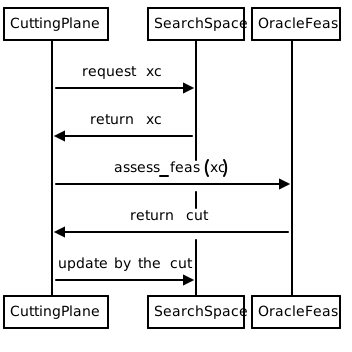
Implementation Details: Solves: find x s.t. f(x) ≤ 0 for convex f(x) using iterative cutting planes - At each iteration:
Query oracle at current center point xc = space.xc()
If feasible (cut=None), return xc as solution
If infeasible, get separating hyperplane (cut) from oracle
Update search space by eliminating region violating cut
Repeat until space becomes too small (tsq < tolerance)
Mathematical Basis: For convex function f and current point xc: - If f(xc) > 0: exists g s.t. f(x) ≥ g^T(x - xc) + f(xc) > 0 for some x - The cut g^T(x - xc) + β ≤ 0 (β = f(xc)) eliminates infeasible region
- Parameters:
omega – Feasibility oracle implementing assess_feas()
space – Search space object maintaining current solution candidate
options – Algorithm control parameters
- Returns:
(Feasible solution, iteration count) or (None, iterations)
- ellalgo.cutting_plane.cutting_plane_optim(omega: ~ellalgo.ell_typing.OracleOptim[~ellalgo.ell_typing.ArrayType], space: ~ellalgo.ell_typing.SearchSpace[~ellalgo.ell_typing.ArrayType], gamma, options=<ellalgo.ell_config.Options object>) Tuple[ArrayType | None, float, int][source]
Cutting-plane method for convex optimization problems.
Solves: maximize γ s.t. f(x) ≥ γ using central/bias cut updates - Maintains current best γ and candidate solution x_best - Alternates between:
Optimality cuts (improve γ when better solution found)
Feasibility cuts (maintain solution space when γ increases)
Update Rules: - Central cut: Tightens search around improving solutions - Bias cut: Maintains feasibility for current γ level
- Parameters:
omega – Optimization oracle implementing assess_optim()
space – Search space maintaining current solution candidate
gamma – Initial best objective value
options – Algorithm control parameters
- Returns:
(Best solution, achieved γ, iteration count)
- ellalgo.cutting_plane.cutting_plane_optim_q(omega: ~ellalgo.ell_typing.OracleOptimQ[~ellalgo.ell_typing.ArrayType], space_q: ~ellalgo.ell_typing.SearchSpaceQ[~ellalgo.ell_typing.ArrayType], gamma, options=<ellalgo.ell_config.Options object>) Tuple[ArrayType | None, float, int][source]
Cutting-plane method for discrete convex optimization.
Handles quantized solutions through: - Continuous relaxation with rounding - Retry mechanism for discrete feasibility checks - Adaptive cut management for discrete solutions
Process Flow: 1. First attempt with continuous solution 2. If feasible, round to nearest integer solution 3. Verify discrete solution feasibility 4. Generate cuts adjusted for rounding effects
- Parameters:
omega – Discrete optimization oracle
space_q – Quantized search space
gamma – Initial best objective value
options – Algorithm parameters
- Returns:
(Best discrete solution, achieved γ, iterations)
ellalgo.ell module
Ell Class
This code defines a class called Ell which represents an ellipsoidal search space. The purpose of this class is to provide methods for updating and manipulating an ellipsoid, which is a mathematical shape used in certain optimization algorithms.
The Ell class takes two main inputs when initialized: a value (which can be a number or a list of numbers) and an array xc. These inputs define the initial shape and position of the ellipsoid. The class doesn’t produce a specific output on its own, but rather provides methods that can be used to modify and query the ellipsoid’s state.
The class achieves its purpose by maintaining several internal attributes that represent the ellipsoid’s properties, such as its center (_xc), a matrix (_mq), and scaling factors (_kappa and _tsq). It then provides methods to update these properties based on different types of “cuts” to the ellipsoid.
The main functionality of the Ell class revolves around three update methods: update_bias_cut, update_central_cut, and update_q. These methods take a “cut” as input, which is essentially a direction and a value that determine how to modify the ellipsoid. The cuts are used to shrink or reshape the ellipsoid, which is a key operation in certain optimization algorithms.
The core logic of these update methods is implemented in the private _update_core method. This method applies the cut to the ellipsoid by performing a series of mathematical operations. It calculates new values for the ellipsoid’s center and shape based on the input cut and a specified cut strategy.
An important aspect of the code is its use of numpy, a library for numerical computations in Python. The class uses numpy arrays and matrix operations to efficiently perform the necessary calculations.
The class also includes some helper methods like xc() and tsq() that allow access to certain properties of the ellipsoid. These can be used to query the current state of the ellipsoid during an optimization process.
Overall, this code provides a flexible and efficient way to represent and manipulate an ellipsoidal search space, which is a crucial component in certain types of optimization algorithms. The class encapsulates the complex mathematics involved in these operations, providing a clean interface for users of the class to work with ellipsoids in their algorithms.
- class ellalgo.ell.Ell(val, xc: ArrayType)[source]
Bases:
SearchSpace2[ArrayType],SearchSpaceQ[ArrayType]- set_xc(xc: ArrayType) None[source]
Setter method for the ellipsoid’s center point.
- Parameters:
xc – The new center point for the ellipsoid
- tsq() float[source]
Getter method for the tsq value.
tsq represents the measure of distance between current center (xc) and optimal point (x*). It’s calculated as kappa * omega, where omega is grad^T * M * grad.
- Returns:
The current tsq value
- update_bias_cut(cut) CutStatus[source]
Update the ellipsoid using a bias cut (deep cut) strategy.
A bias cut is a general cut that can be either deep or shallow. This method delegates to _update_core with the standard cut strategy.
- Parameters:
cut – A tuple containing (gradient, beta) for the cut
- Returns:
CutStatus indicating success or failure of the update
Examples
>>> ell = Ell(1.0, [1.0, 1.0, 1.0, 1.0])
>>> cut = (np.array([1.0, 1.0, 1.0, 1.0]), 1.0)
>>> status = ell.update_bias_cut(cut)
>>> print(status)
CutStatus.Success
- update_central_cut(cut) CutStatus[source]
Update the ellipsoid using a central cut strategy.
A central cut is a special case where beta = 0, meaning the cut passes exactly through the center of the current ellipsoid.
- Parameters:
cut – A tuple containing (gradient, beta) for the cut
- Returns:
CutStatus indicating success or failure of the update
Examples
>>> ell = Ell(1.0, [1.0, 1.0, 1.0, 1.0])
>>> cut = (np.array([1.0, 1.0, 1.0, 1.0]), 0.0)
>>> status = ell.update_central_cut(cut)
>>> print(status)
CutStatus.Success
- update_q(cut) CutStatus[source]
Update the ellipsoid using a non-central cut strategy for Q.
This is used for non-central cuts (either deep or shallow) in Q space.
- Parameters:
cut – A tuple containing (gradient, beta) for the cut
- Returns:
CutStatus indicating success or failure of the update
Examples
>>> ell = Ell(1.0, [1.0, 1.0, 1.0, 1.0])
>>> cut = (np.array([1.0, 1.0, 1.0, 1.0]), -0.01)
>>> status = ell.update_q(cut)
>>> print(status)
CutStatus.Success
ellalgo.ell_calc module
EllCalc (Ellipsoid Calculator)
The EllCalc class is a tool designed to perform calculations related to ellipsoids, which are mathematical shapes similar to stretched spheres. This code is part of an algorithm used in optimization problems, specifically for a method called the ellipsoid method.
The main purpose of this code is to provide various functions that calculate how to adjust or “cut” an ellipsoid based on certain input parameters. These calculations are used to gradually refine the search space in optimization problems, helping to find optimal solutions more efficiently.
The primary input for this class is the dimension of the problem space, represented by the parameter ‘n’ in the constructor. Other inputs vary depending on the specific calculation method being used, but generally include values like ‘beta’ (which represents a cut point) and ‘tsq’ (which is related to the tolerance or precision of the cut).
The outputs of the various calculation methods are typically tuples containing a status (indicating whether the calculation was successful, had no solution, or had no effect) and, if successful, a set of three float values. These values (often named rho, sigma, and delta) represent parameters used to update the ellipsoid in the optimization algorithm.
The class achieves its purpose through a series of mathematical calculations. It uses concepts from linear algebra and geometry to determine how to shrink or reshape the ellipsoid based on the input parameters. The exact calculations are quite complex, but they essentially determine where to make a “cut” in the ellipsoid and how to reshape it accordingly.
Some important logic flows in the code include:
Checking if the input parameters are valid and returning appropriate status codes if they’re not.
Deciding between different types of cuts (single, parallel, central) based on the input.
Performing specific calculations for each type of cut.
The code also includes a helper class (EllCalcCore) that likely handles some of the more complex mathematical operations.
Overall, this code serves as a crucial component in an optimization algorithm, providing the mathematical backbone for adjusting the search space as the algorithm progresses towards finding an optimal solution. While the underlying math is complex, the code encapsulates this complexity into methods that can be easily used by other parts of the optimization algorithm.
- class ellalgo.ell_calc.EllCalc(n: int)[source]
Bases:
objectThe EllCalc class is used for calculating ellipsoid parameters and has attributes for storing constants and configuration options.
This class serves as the main interface for performing ellipsoid calculations in optimization algorithms. It provides methods for different types of cuts (single, parallel, central) and handles the logic for selecting the appropriate cut type based on input parameters.
The class uses an instance of EllCalcCore to perform the actual mathematical computations, while handling the higher-level logic and status reporting.
Examples
>>> from ellalgo.ell_calc import EllCalc
>>> calc = EllCalc(3)
- calc_bias_cut(beta: float, tsq: float) Tuple[CutStatus, Tuple[float, float, float] | None][source]
Calculate parameters for a single deep cut.
A deep cut is a hyperplane cut that doesn’t necessarily pass through the center of the ellipsoid. This method validates the input and calculates the transformation parameters if valid.
- Parameters:
- Returns:
Status and optional result tuple
Examples
>>> from ellalgo.ell_calc import EllCalc
>>> calc = EllCalc(3)
>>> calc.calc_bias_cut(1.0, 4.0)
(<CutStatus.Success: 0>, (1.25, 0.8333333333333334, 0.84375))
>>> calc.calc_bias_cut(0.0, 4.0)
(<CutStatus.Success: 0>, (0.5, 0.5, 1.125))
>>> calc.calc_bias_cut(1.5, 2.0)
(<CutStatus.NoSoln: 1>, None)
- calc_bias_cut_q(beta: float, tsq: float) Tuple[CutStatus, Tuple[float, float, float] | None][source]
Calculate deep cut (discrete optimization version).
This version includes additional checks for numerical stability in discrete optimization problems, specifically checking if eta ≤ 0.0.
- Parameters:
- Returns:
Status and optional result tuple
Examples
>>> from ellalgo.ell_calc import EllCalc
>>> calc = EllCalc(3)
>>> calc.calc_bias_cut_q(0.0, 4.0)
(<CutStatus.Success: 0>, (0.5, 0.5, 1.125))
>>> calc.calc_bias_cut_q(1.5, 2.0)
(<CutStatus.NoSoln: 1>, None)
>>> calc.calc_bias_cut_q(-1.5, 4.0)
(<CutStatus.NoEffect: 2>, None)
- calc_parallel(beta0: float, beta1: float, tsq: float) Tuple[CutStatus, Tuple[float, float, float] | None][source]
Calculate parameters for a parallel deep cut.
A parallel cut involves two parallel hyperplanes cutting the ellipsoid. This method calculates the transformation parameters for such a cut after validating the inputs.
- Parameters:
- Returns:
Status and optional result tuple
The method first checks if beta1 < beta0 (invalid case), then checks if the cut would be outside the ellipsoid (tsq ≤ b1sq), and falls back to a single cut if so. Otherwise, it calculates the parallel cut parameters.
- calc_parallel_q(beta0: float, beta1: float, tsq: float) Tuple[CutStatus, Tuple[float, float, float] | None][source]
Calculate parallel deep cut (discrete optimization version).
This version includes additional checks for numerical stability in discrete optimization problems, specifically checking if eta ≤ 0.0.
- calc_single_or_parallel(beta, tsq: float) Tuple[CutStatus, Tuple[float, float, float] | None][source]
Calculate either a single deep cut or a parallel cut based on input parameters.
This method serves as a dispatcher that chooses between single cut and parallel cut calculations based on the type of beta parameter provided.
- Parameters:
beta – Either a single numeric value (for single cut) or a list of two values (for parallel cut)
tsq (float) – The square of the tolerance parameter (τ²) used in the cut calculations
- Returns:
A tuple containing: - CutStatus: indicating success or failure - Optional tuple of (rho, sigma, delta) if successful
Examples
>>> from ellalgo.ell_calc import EllCalc
>>> calc = EllCalc(3)
- calc_single_or_parallel_central_cut(beta, tsq: float) Tuple[CutStatus, Tuple[float, float, float] | None][source]
Calculate either a single central cut or a parallel central cut.
Similar to calc_single_or_parallel but specifically for central cuts (cuts passing through the center of the ellipsoid).
- Parameters:
beta – Either a single numeric value or a list of two values
tsq (float) – The square of the tolerance parameter (τ²)
- Returns:
A tuple containing status and optional result values
Examples
>>> from ellalgo.ell_calc import EllCalc
>>> calc = EllCalc(4)
>>> calc.calc_single_or_parallel_central_cut([0, 0.11], 0.01)
(<CutStatus.Success: 0>, (0.020000000000000004, 0.4, 1.0666666666666667))
- calc_single_or_parallel_q(beta, tsq: float) Tuple[CutStatus, Tuple[float, float, float] | None][source]
Calculate either single or parallel deep cut (discrete version).
This is a variant of calc_single_or_parallel designed for discrete optimization problems, with additional checks for numerical stability.
- Parameters:
beta – Either a single numeric value or a list of two values
tsq (float) – Square of the tolerance parameter (τ²)
- Returns:
Status and optional result tuple
- helper: EllCalcCore
ellalgo.ell_calc_core module
This module contains the EllCalcCore class.
This code defines a class called EllCalcCore, which is designed to perform calculations related to ellipsoids in mathematics. An ellipsoid is a 3D shape that’s like a stretched or squashed sphere. The class provides methods to calculate various parameters of ellipsoids under different conditions.
The main purpose of this code is to provide a set of tools for working with ellipsoids in optimization problems. It takes in various numerical inputs representing different aspects of an ellipsoid or cuts through it, and produces output values that describe how the ellipsoid should be adjusted or analyzed.
The class is initialized with a single input ‘n_f’, which represents the dimension of the space the ellipsoid exists in. This value is used to set up several constant values that are used in later calculations.
The class provides several methods, each performing a different type of calculation:
calc_central_cut: This calculates parameters for a cut through the center of the ellipsoid.
calc_bias_cut and calc_bias_cut_fast: These calculate parameters for a cut that doesn’t go through the center.
calc_parallel_central_cut and calc_parallel_central_cut_old: These handle cuts that are parallel to a central cut.
calc_parallel_bias_cut, calc_parallel_bias_cut_fast, and calc_parallel_bias_cut_old: These deal with parallel cuts that don’t go through the center.
Each of these methods takes in one or more numerical inputs (like ‘tau’, ‘beta’, ‘tsq’) that represent different aspects of the cut or the ellipsoid. They then perform a series of mathematical calculations using these inputs and the constants set up during initialization. The calculations involve basic arithmetic, square roots, and some more complex formulas specific to ellipsoid geometry.
The output of each method is typically a tuple of three float values, often represented as (rho, sigma, delta). These values describe how the ellipsoid should be adjusted based on the cut that was calculated.
The code achieves its purpose by encapsulating all these complex mathematical calculations into easy-to-use methods. A programmer can create an instance of EllCalcCore and then call these methods as needed, without having to understand all the underlying mathematics.
The main logic flow in this code is from the input parameters, through the mathematical calculations, to the output tuple. The data transformations happening are primarily mathematical: converting the input parameters into the desired output parameters using the formulas of ellipsoid geometry.
This code is a tool for more complex algorithms that might be using these ellipsoid calculations as part of a larger optimization or analysis process. It provides a clean, object-oriented way to perform these specific mathematical operations.
- class ellalgo.ell_calc_core.EllCalcCore(n_f: float)[source]
Bases:
objectThe EllCalcCore class is used for calculating ellipsoid parameters.
This class provides methods to compute various parameters (rho, sigma, delta) that define how an ellipsoid should be transformed when cut by different types of hyperplanes. These parameters are essential in ellipsoid-based optimization algorithms.
Examples
>>> calc = EllCalcCore(3)
- calc_bias_cut(beta: float, tau: float) Tuple[float, float, float][source]
Calculate deep cut values.
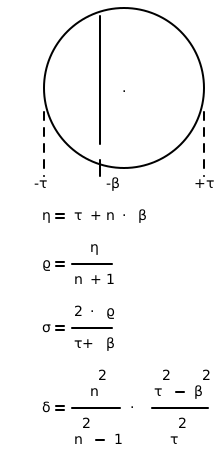
Calculates the deep cut values ρ, σ, δ for given β and τ. This is the standard version that computes η internally before calling calc_bias_cut_fast.
A deep cut is a generalization of a central cut where the cutting hyperplane doesn’t necessarily pass through the center of the ellipsoid. The parameters determine how to transform the ellipsoid after the cut.
- Parameters:
- Returns:
Tuple of (ρ, σ, δ) values for the biased cut
- Return type:
Examples
>>> calc = EllCalcCore(3)
>>> calc.calc_bias_cut(1.0, 2.0)
(1.25, 0.8333333333333334, 0.84375)
>>> calc.calc_bias_cut(0.0, 2.0)
(0.5, 0.5, 1.125)
- calc_bias_cut_fast(beta: float, tau: float, eta: float) Tuple[float, float, float][source]
Calculates the deep cut ellipsoid parameters using precomputed eta values.
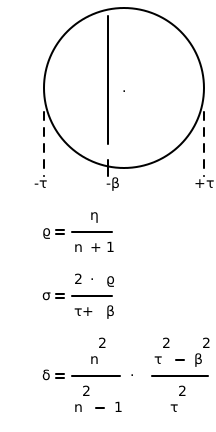
This is an optimized version of calc_bias_cut that takes a precomputed eta value (η = τ + n⋅β) as input to avoid redundant calculations when eta is already known.
The method computes parameters for a biased (non-central) cut of the ellipsoid, where the cut doesn’t pass through the center. The parameters determine how to transform the ellipsoid after the cut.
- Parameters:
- Returns:
Tuple of (ρ, σ, δ) values for the biased cut
- Return type:
Examples
>>> calc = EllCalcCore(3)
>>> calc.calc_bias_cut_fast(1.0, 2.0, 5.0)
(1.25, 0.8333333333333334, 0.84375)
>>> calc.calc_bias_cut_fast(0.0, 2.0, 2.0)
(0.5, 0.5, 1.125)
- calc_central_cut(tau: float) Tuple[float, float, float][source]
Calculate the central cut values.
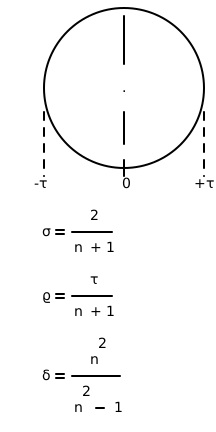
The calc_central_cut method calculates the central cut values ρ, σ, δ based on the input tau value. A central cut is a hyperplane that passes through the center of the ellipsoid.
The parameters returned are: - ρ (rho): Determines the shift of the ellipsoid center - σ (sigma): Determines how much to scale the ellipsoid - δ (delta): Determines how much to stretch the ellipsoid
- Parameters:
tau (float) – The distance parameter for the central cut
- Returns:
Tuple of (ρ, σ, δ) values for the central cut
- Return type:
Examples
>>> calc = EllCalcCore(3)
>>> calc.calc_central_cut(4.0)
(1.0, 0.5, 1.125)
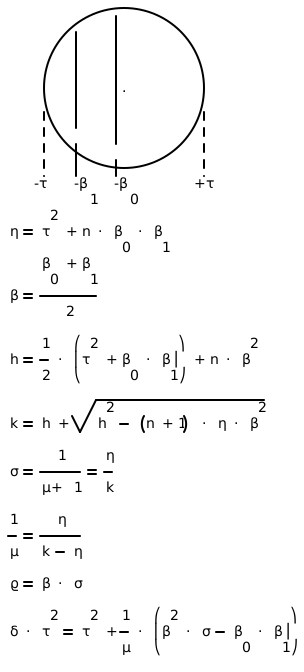
- calc_parallel_bias_cut(beta0: float, beta1: float, tsq: float) Tuple[float, float, float][source]
Calculation Parallel Deep Cut (15 mul/div + 1 sqrt)
Computes parameters for a biased cut that is parallel to another biased cut. This version computes intermediate values (b0b1 and eta) internally before calling the fast version.
The method calculates: - ρ: Center shift parameter - σ: Scaling parameter - δ: Stretching parameter
- Parameters:
- Returns:
Tuple of (ρ, σ, δ) values for the parallel biased cut
- Return type:
Examples
>>> calc = EllCalcCore(4)
>>> calc.calc_parallel_bias_cut(0.01, 0.11, 0.01)
(0.027228509068282114, 0.45380848447136857, 1.0443438549074862)
>>> calc.calc_parallel_bias_cut(-0.25, 0.25, 1.0)
(0.0, 0.8, 1.25)
>>> calc.calc_parallel_bias_cut(0.0, 0.09, 0.01)
(0.020941836487980856, 0.46537414417735234, 1.082031295477563)
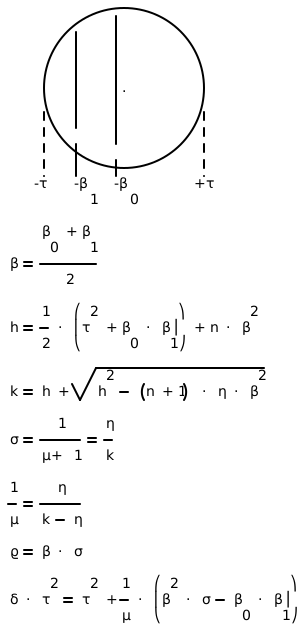
- calc_parallel_bias_cut_fast(beta0: float, beta1: float, tsq: float, b0b1: float, eta: float) Tuple[float, float, float][source]
Calculation Parallel Deep Cut (13 mul/div + 1 sqrt)
Optimized version of parallel biased cut calculation that takes precomputed b0b1 (β₀β₁) and eta (η) values as input to reduce computation.
This version is more efficient when the calling code can precompute these values, saving redundant calculations.
- Parameters:
- Returns:
Tuple of (ρ, σ, δ) values for the parallel biased cut
- Return type:
Examples
>>> calc = EllCalcCore(4)
>>> calc.calc_parallel_bias_cut_fast(0.11, 0.01, 0.01, 0.0011, 0.0144)
(0.027228509068282114, 0.45380848447136857, 1.0443438549074862)
>>> calc.calc_parallel_bias_cut_fast(-0.25, 0.25, 1.0, -0.0625, 0.75)
(0.0, 0.8, 1.25)
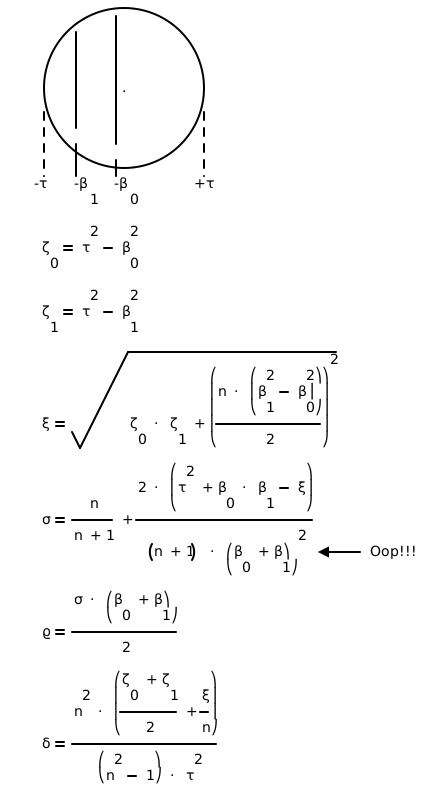
- calc_parallel_bias_cut_old(beta0: float, beta1: float, tsq: float) Tuple[float, float, float][source]
Calculation Parallel Deep Cut
Original version of the parallel biased cut calculation. This version uses a different mathematical formulation that requires more computations than the optimized versions.
The method calculates parameters for transforming an ellipsoid after a parallel biased cut, where the cut is parallel to another biased cut.
- Parameters:
- Returns:
Tuple of (ρ, σ, δ) values for the parallel biased cut
- Return type:
Examples
>>> calc = EllCalcCore(4)
>>> calc.calc_parallel_bias_cut_old(0.11, 0.01, 0.01)
(0.02722850906828212, 0.4538084844713687, 1.0443438549074862)
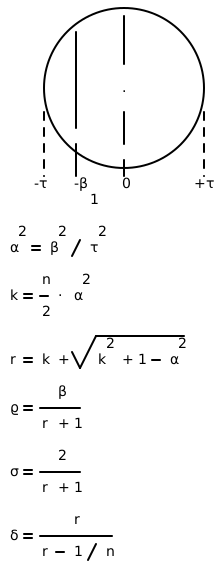
- calc_parallel_central_cut(beta1: float, tsq: float) Tuple[float, float, float][source]
Calculate Parallel Central Cut (7 mul/div + 1 sqrt)
Computes parameters for a cut that is parallel to a central cut but offset by beta1. This optimized version uses fewer operations than the old version.
The method calculates: - ρ: Determines the shift of the ellipsoid center - σ: Scaling factor for the ellipsoid - δ: Stretching factor for the ellipsoid
- Parameters:
- Returns:
Tuple of (ρ, σ, δ) values for the parallel central cut
- Return type:
Examples
>>> calc = EllCalcCore(4)
>>> calc.calc_parallel_central_cut(0.09, 0.01)
(0.020941836487980856, 0.46537414417735234, 1.082031295477563)
- calc_parallel_central_cut_old(beta1: float, tsq: float) Tuple[float, float, float][source]
Calculate Parallel Central Cut
Original version of the parallel central cut calculation. This version uses more operations than the optimized version.
The method calculates parameters for transforming an ellipsoid after a parallel central cut, where the cut is parallel to a central cut but offset by beta1.
- Parameters:
- Returns:
Tuple of (ρ, σ, δ) values for the parallel central cut
- Return type:
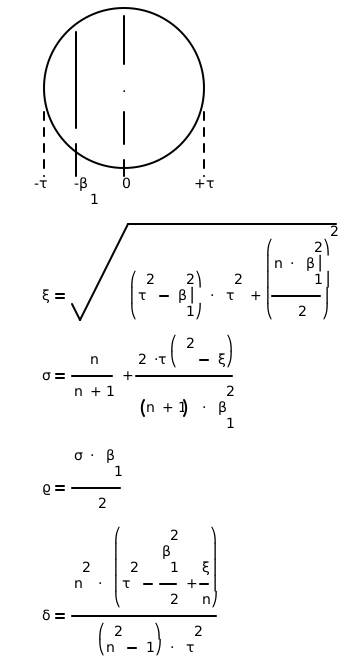
Examples
>>> calc = EllCalcCore(4)
>>> calc.calc_parallel_central_cut_old(0.09, 0.01)
(0.02094183648798086, 0.46537414417735246, 1.082031295477563)
ellalgo.ell_config module
ellalgo.ell_stable module
- class ellalgo.ell_stable.EllStable(val, xc: ArrayType)[source]
Bases:
SearchSpace[ArrayType],SearchSpaceQ[ArrayType]- set_xc(x: ArrayType) None[source]
The function sets the value of the variable _xc to the input x.
- Parameters:
x (ArrayType) – The parameter x is of type ArrayType
- tsq() float[source]
The function tsq returns the measure of the distance between xc and x*. :return: The method is returning a float value, which represents the measure of the distance between xc and x*.
- update_bias_cut(cut) CutStatus[source]
The function update_bias_cut is an implementation of the SearchSpace interface that updates the cut status based on a given cut.
- Parameters:
cut – The cut parameter is of type _type_ and it represents some kind of cut
- Returns:
a CutStatus object.
Examples
>>> ell = EllStable(1.0, [1.0, 1.0, 1.0, 1.0])
>>> cut = (np.array([1.0, 1.0, 1.0, 1.0]), 1.0)
>>> status = ell.update_bias_cut(cut)
>>> print(status)
CutStatus.Success
- update_central_cut(cut) CutStatus[source]
The function update_central_cut is an implementation of the SearchSpace interface that updates the cut status based on a given cut.
- Parameters:
cut – The cut parameter is of type _type_ and it represents a cut
- Returns:
a CutStatus object.
Examples
>>> ell = EllStable(1.0, [1.0, 1.0, 1.0, 1.0])
>>> cut = (np.array([1.0, 1.0, 1.0, 1.0]), 0.0)
>>> status = ell.update_central_cut(cut)
>>> print(status)
CutStatus.Success
- update_q(cut) CutStatus[source]
The function update_q is an implementation of the SearchSpaceQ interface that updates the cut status based on a given cut.
- Parameters:
cut – The cut parameter is of type _type_ and it represents the cut that needs to be updated
- Returns:
a CutStatus object.
Examples
>>> ell = EllStable(1.0, [1.0, 1.0, 1.0, 1.0])
>>> cut = (np.array([1.0, 1.0, 1.0, 1.0]), -0.01)
>>> status = ell.update_q(cut)
>>> print(status)
CutStatus.Success
ellalgo.ell_typing module
- class ellalgo.ell_typing.OracleFeas2[source]
Bases:
OracleFeas[ArrayType]
- class ellalgo.ell_typing.OracleOptim[source]
Bases:
Generic[ArrayType]- abstractmethod assess_optim(xc: ArrayType, gamma) Tuple[Tuple[ArrayType, float | MutableSequence], float | None][source]
The assess_optim function assesses the feasibility based on the given xc and gamma parameters.
- Parameters:
xc (ArrayType) – An array of values that represents the current solution or point in the optimization process
gamma – The gamma parameter is the value that we are trying to optimize or minimize. It could be a numerical value, a function, or any other type of object that represents the optimization goal
- class ellalgo.ell_typing.OracleOptimQ[source]
Bases:
Generic[ArrayType]- abstractmethod assess_optim_q(xc: ArrayType, gamma, retry: bool) Tuple[Tuple[ArrayType, float | MutableSequence], ArrayType, float | None, bool][source]
assessment of optimization (discrete)
The function assess_optim_q assesses the feasibility of a design variable and returns a tuple containing a cut, an array, an optional float, and a boolean value.
- Parameters:
xc (ArrayType) – An array or list representing the current solution or configuration being assessed for optimization
gamma – The gamma parameter is the desired value or condition that the optimization algorithm is trying to achieve. It could be a specific value, a range of values, or a certain condition that needs to be satisfied
retry (bool) – A boolean flag indicating whether to retry the optimization if it fails
- class ellalgo.ell_typing.SearchSpace[source]
Bases:
Generic[ArrayType]- abstractmethod tsq() float[source]
The function tsq returns the measure of the distance between xc and x*. :return: The method is returning a float value, which represents the measure of the distance between xc and x*.
- abstractmethod update_bias_cut(cut: Tuple[ArrayType, float | MutableSequence]) CutStatus[source]
The update_bias_cut function is an abstract method that takes a Cut object as input and returns a CutStatus object.
- Parameters:
cut (Cut) – The cut parameter is an instance of the Cut class. It represents a deep-cut that needs to be updated
- abstractmethod update_central_cut(cut: Tuple[ArrayType, float | MutableSequence]) CutStatus[source]
The update_central_cut function is an abstract method that updates the central cut and returns the status of the cut.
- Parameters:
cut (Cut) – The “cut” parameter is an instance of the Cut class. It represents the central cut that needs to be updated
- class ellalgo.ell_typing.SearchSpace2[source]
Bases:
SearchSpace[ArrayType]
- class ellalgo.ell_typing.SearchSpaceQ[source]
Bases:
Generic[ArrayType]- abstractmethod tsq() float[source]
The function tsq returns the measure of the distance between xc and x*. :return: The method is returning a float value, which represents the measure of the distance between xc and x*.
ellalgo.skeleton module
This is a skeleton file that can serve as a starting point for a Python
console script. To run this script uncomment the following lines in the
[options.entry_points] section in setup.cfg:
console_scripts =
     fibonacci = ellalgo.skeleton:run
Then run pip install . (or pip install -e . for editable mode)
which will install the command fibonacci inside your current environment.
Besides console scripts, the header (i.e. until _logger…) of this file can
also be used as template for Python modules.
Note
This file can be renamed depending on your needs or safely removed if not needed.
References
- ellalgo.skeleton.main(args)[source]
Wrapper allowing
fib()to be called with string arguments in a CLI fashionInstead of returning the value from
fib(), it prints the result to thestdoutin a nicely formatted message.- Parameters:
args (List[str]) – command line parameters as list of strings (for example
["--verbose", "42"]).
- ellalgo.skeleton.parse_args(args)[source]
Parse command line parameters
- Parameters:
args (List[str]) – command line parameters as list of strings (for example
["--help"]).- Returns:
command line parameters namespace
- Return type: